Man, this blog has been lingering in the back of my mind all weekend. o-o;
I feel so bad for not updating it aggh. But I seriously didn't want to do any work on my coding this weekend... I've been madly creative and inspired (and also kicking ass in pvp on ToR with Fiance...)
This morning hasn't been crazily busy by any means, so I took it upon myself to scribble down some more notes from K&R. Mom walked by my desk and made a comment about how fast I write, then became very interested in what I was writing about. I flipped the cover of K&R over to show her, and the following conversation ensued:
Mom: "Coding!?"
Me: *grins* "Include standard input/output dot H..."
Mom: "What the fuck, girls don't code!!"
It made me giggle. C:
Anyway, I'm getting into Character Input and Output, specifically with getchar and putchar. I really have to work at this one to figure out what they're talking about. I'm trying to paraphrase, but I keep finding myself writing their explanations word-for-word because I don't understand them enough to paraphrase. Baahh.
First, I need to transcribe my notes from 1.4. Then I'll move to 1.5, which is input/output for character info. Belowwww the break...
Showing posts with label kr. Show all posts
Showing posts with label kr. Show all posts
Wednesday, May 29, 2013

Thursday, May 23, 2013
BAH!
Working on coding and writing tonight, because my fiance has a few projects he's busy with. I took more notes from K&R, but man do I still have a long way to go. No better way to put your knowledge to the test with miniature tests, like using what you've learned so far to write a program from memory.
Looking back over that little chunk of text (I wrote it out in my notebook), I made 4 terrible mistakes that would've kept the whole thing from compiling... The worst one was leaving out the variable assignment!! Aggh!!
It's okay though. Deep breaths, and lots of note-taking. I've taken to slowly working through the descriptions of the statements, going step by step until I'm certain that I understand what they're talking about. If I can keep that up, I think I'll be okay.
Anyway, for more notes, click the break!
Looking back over that little chunk of text (I wrote it out in my notebook), I made 4 terrible mistakes that would've kept the whole thing from compiling... The worst one was leaving out the variable assignment!! Aggh!!
It's okay though. Deep breaths, and lots of note-taking. I've taken to slowly working through the descriptions of the statements, going step by step until I'm certain that I understand what they're talking about. If I can keep that up, I think I'll be okay.
Anyway, for more notes, click the break!
Monday, May 20, 2013
Xcode
Seeing as I do a fair bit of work on my Mac partition, I took the plunge and downloaded an IDE called Xcode.
I wanted to share some of the things I've discovered today while poking around with this powerful application:
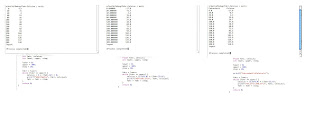
I wanted to share some of the things I've discovered today while poking around with this powerful application:
- IDEs will require some sort of learning curve. Luckily, this one is very straight-forward, but I haven't investigated any for Windows or Linux systems yet. Yeah, go figure that after being so excited to get Linux on my zombiemac, I'm using Mac OSX more...
- There is a LOT of good information in the documentation for the IDEs, but chances are, you'll need to sift to get to what you're trying to figure out. The communities are pretty tight-lipped, it seems, and that's understandable. I think, perhaps, they want to protect the diminishing quality of really good coders who legitimately want to know what they're doing. But, that could be a brash opinion from a novice who doesn't really know the communities very well.
- For the kind of coding that is tackled in K&R and King, there really don't need to be any shiny bells and whistles. In Xcode, at least, just enter these programs into a "Command Line Tool". It uses C libraries automatically and opens up a Terminal window to produce the effects of the program. I have no idea if other IDEs will have settings like these, though.
- I just want to put this out there; Don't forget to compile the code after you've made a change. Seriously, you can make every change you want, but if you don't compile it after, it won't have any effect on your output. I found this out the hard way, despite this being a kind of common-sense thing (and I'm absolutely certain I've read it somewhere before and just forgot with the excitement of having things WORK in Xcode haha).
- Xcode can do a LOT of things. The other IDEs you might find are also designed to handle a TON of work. As with anything, take small steps and try not to get overwhelmed. If you don't need a feature (like a graphical interface), don't learn about how to code it right away!
Anyway, now that that's out of the way, here are a few things I was playing around with today. GO FIGURE that "hello, world!" was actually the program that fell victim to my lack of good knowledge with Xcode. After I got the F/C conversion table working, I didn't feel like I needed to go back and do it again, heh.
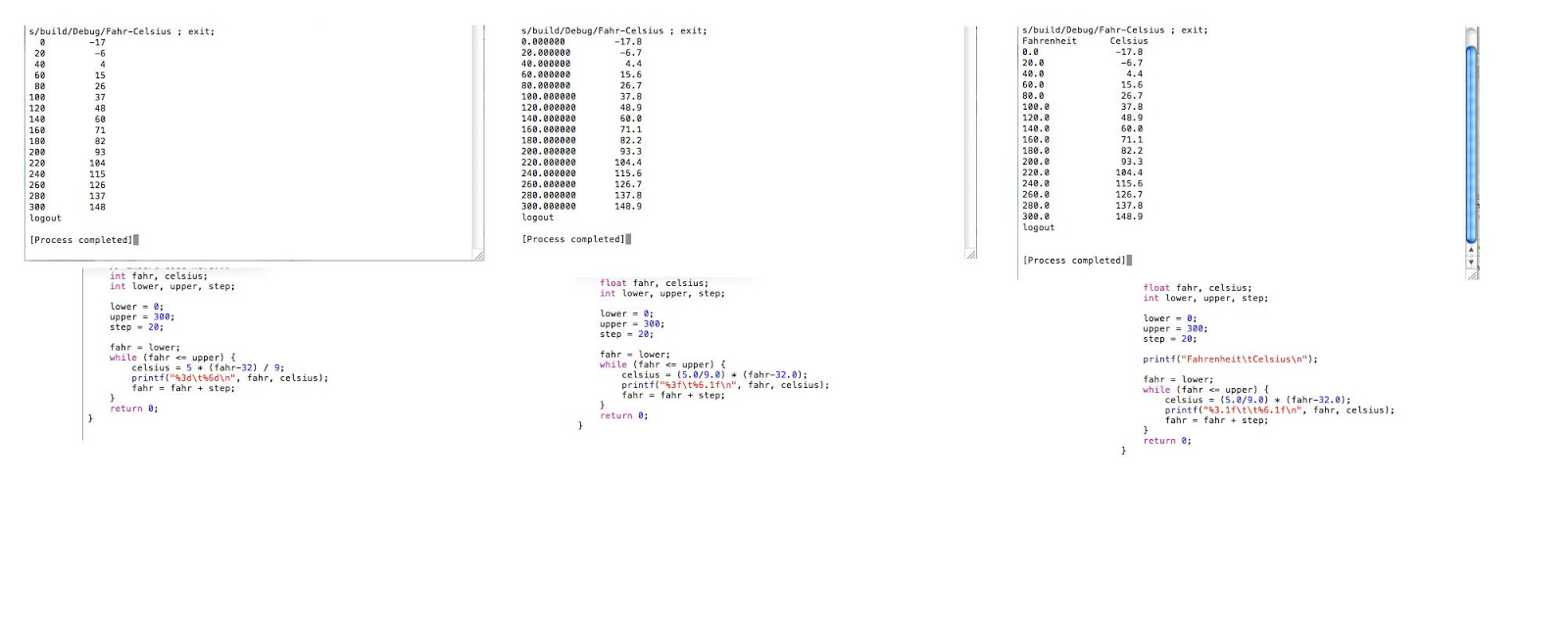
I'm hoping this can be read clearly enough... (Pro Tip: Open in New Tab, it will let you zoom reeeeal close)
The example to the far left is the original program. It takes the Fahrenheit values, in increments of 20, and calculates the Celsius value by using the algebraic formula.
The middle example converts the integers (int) of Fahrenheit and Celsius into floating-point numbers, so they can be converted with more accuracy. Floating-point numbers allow the usage of decimals.
The right-hand example shows an addition that was suggested by K&R as an exercise; a header to the table.
The next topic in K&R is the for statement. Yay for being excited to carry on with coding before delving into video games! I actually made my fiance go play ToR by himself after dinner so I could work on this stuff! Haha.
Sunday, May 19, 2013
Subscribe to:
Posts (Atom)